Cards game for developers
Goal of the demonstrator
The DestinE Earth Pulse demonstrator aims to illustrate the capabilities of the DestinE Platform environment through an interactive game that combines local climate, socio-economic, and satellite information. Designed for non-expert users, the game allows players to explore data and create their own customised versions without any coding skills. By leveraging DestinE Platform services to access and process Climate Digital Twin data, Eurostat statistics, and Copernicus satellite imagery at NUTS-3 level, the demonstrator showcases how complex information can be transformed into engaging, accessible experiences. Packaged as a mobile-friendly game that can be easily shared and played, Earth Pulse serves as an entry point for new audiences, raising awareness and visibility of the Destination Earth initiative beyond its traditional user community.
Game architecture
Components overview
Frontend: Nuxt 3 web application, user interface, game client.
Frontend Dashboard: Vite web application, game stats monitoring and admin panel.
Backend (apiserver): FastAPI server, game logic, API endpoints.
API Moderation: FastAPI service for content moderation.
DestinE Streamer API: FastAPI service for ERA5 historical temperature data retrieval.
Database: PostgreSQL, stores game data, city stats, and indicators.
Monitoring: Prometheus & Grafana stack for observability.
Deployment: Kubernetes Helm charts and deployment manifests.
Structure overview
cards-game/
├── apiserver/               # Backend API and game logic (FastAPI)
   ├── alembic/versions              # Database migration  files
├── frontend/                # Frontend UI, the "Game App" (Nuxt 3)
├── frontend-dashboard/      # Frontend dashboard app (Vue 3 + Vite)
├── api-moderation/          # Content moderation service (FastAPI)
├── destine-streamer-api/    # ERA5 temperature data service (FastAPI)
├── monitoring/              # Prometheus & Grafana observability stack
├── deploy/                  # Kubernetes Helm charts and manifests
├── Doc/                     # Documentation (guides and diagrams)
├── tests/                   # Tests and utilities (e.g., JWT generator)
├── .gitlab-ci.yml           # GitLab CI/CD pipeline configuration
├── docker-compose.yml       # Docker Compose for local development
Prerequisites
Installed tools
Docker (for containerized setup)
Python 3.9+ (for backend)
Node.js 18+ (for frontend)
PostgreSQL (for database)
See
.env.templateand.env.examplefor environment variables
Accounts
DestinE platform: An account on the DestinE platform is necessary, which is authorized to access the Climate Digital Twin data.
OpenStreetMap: To make requests via OverPass API & Nominatim API, it is not necessary to create an account.
Installation & Run
Local deployment (development)
ℹ️ You need to ensure a connection to the database and extensions
unaccentandpg_trgmare enabled. The database schema is automatically managed via Alembic migrations.
cd frontend
npm install
npm run dev
# Visit http://localhost:3000
cd apiserver
pip install -r requirements.txt
uvicorn main:app --host localhost --reload --port 8000 --log-config logging-local.yaml
# API available at http://localhost:8000
# Swagger available at http://localhost:8000/docs
The backend uses Alembic for database schema management. Migrations are automatically run via the entrypoint script when deploying to production or other environments.
Local Development:
The database is expected to be up-to-date when running locally. If you need to apply pending migrations manually:
cd apiserver
alembic upgrade head
Production Deployment:
Set
RUN_MIGRATION=trueenvironment variable before starting the container.The entrypoint script (
entrypoint.sh) will:Verify required database environment variables (
APISERVER_DB_USER,APISERVER_DB_PASSWORD,DB_HOST,DB_PORT,APISERVER_DB_NAME)Configure Alembic with the database connection
Run all pending migrations
Start the API server
Example Docker deployment:
docker run -e RUN_MIGRATION=true \
  -e APISERVER_DB_USER=user \
  -e APISERVER_DB_PASSWORD=password \
  -e DB_HOST=db-host \
  -e DB_PORT=5432 \
  -e APISERVER_DB_NAME=cards_game \
  -e ENV=production \
  apiserver:latest
cd frontend-dashboard
npm install
npm run dev
# Visit http://localhost:5173
cd api-moderation
pip install -r requirements.txt
uvicorn main:app --host localhost --reload --port 8001
# API available at http://localhost:8001
cd destine-streamer-api
pip install -r requirements.txt
uvicorn main:app --host localhost --reload --port 8002
# API available at http://localhost:8002
Development
Logging Configuration (apiserver)
The backend uses environment-specific logging configurations to manage log levels and outputs. Each configuration file is located in the apiserver/ directory:
logging-local.yaml: Used for local development (DEBUG level, colored output)
logging-development.yaml: For development environments (DEBUG level)
logging-production.yaml: For production deployments (WARN level)
logging-validation.yaml: For validation/staging environments (WARN level)
Log Files
When running the server, log files are created in the logs/ directory:
apiserver/logs/app.log— Application-level logsapiserver/logs/access.log— HTTP access logs (uvicorn)apiserver/logs/error.log— Error logs only
Specifying a Logging Config
To use a specific logging configuration when running locally:
uvicorn main:app --host localhost --reload --port 8000 --log-config logging-local.yaml
Or when deployed in a container, set the ENV variable:
docker run -e ENV=production apiserver:latest
# This will use logging-production.yaml
Game mode documentation
Full technical documentation for Strategic mode is available in https://earth-pulse.destine.eu/documentation/strategic_mode_for_developers.html.
Full technical documentation for Quiz mode is available in https://earth-pulse.destine.eu/documentation/quiz_mode_for_developers.html.
Full technical documentation for Beat Desty mode is available in https://earth-pulse.destine.eu/documentation/beat_desty_mode_for_developers.html.
Full technical documentation for Super Strategic mode is available in https://earth-pulse.destine.eu/documentation/super_strategic_mode_for_developers.html.
Environment
Game app
Located in the
frontend/directory.Built with Nuxt 3, Vue 3, Tailwind CSS, PrimeVue, TypeScript.
Server
Located in the
apiserver/directory.Built with FastAPI, SQLAlchemy/SQLModel, asyncpg, Boto3 (S3 integration).
Dashboard
Located in the
frontend-dashboard/directory.Built with Vite, Vue 3, and Tailwind CSS.
API Moderation
Located in the
api-moderation/directory.Built with FastAPI for content moderation logic.
DestinE Streamer API
Located in the
destine-streamer-api/directory.Built with FastAPI for retrieving ERA5 climate data.
Integrates with the DestinE Streamer service via Playwright browser automation.
Accessibility plugin (Sienna)
Official documentation: Sienna
Provenance: imported js file is stored in the
frontend/public/accessibility-widgetdirectory.Personalization: custom CSS styles override default Sienna styles to match the game’s theme and color scheme.
Disabling Sienna during gameplay
A dedicated toggle disables Sienna helpers when entering live gameplay to avoid UI noise for players.
Wire this toggle into the game route/layout guard so helpers are off as soon as a match starts, and re-enabled when exiting back to creation/editor flows.
Cover both states in automated tests (enabled in editor flows, disabled in gameplay) to prevent regressions.
Located in
frontend/plugins/hideAccessibility.client.ts.
Game app code structure
components/: Vue components (UI, cards, modals, etc.)pages/: Nuxt pages (routes)composables/: Reusable logic (websocket game logic)assets/: Static assets (images, styles)public/: Static assets (images, video, favicon, etc.)const/: Constants and configurationapi/: API client logictypes/: TypeScript interfacesstore/: Pinia store for state management
Cards creation
Card data is generated from open datasets (see frontend/pages/data-information.vue).
Each card represents a location, enriched with climate indicators and demographic data.
Bounding Box Calculation
We use OpenStreetMap’s Nominatim/Overpass APIs (via our
bbox.pyservice) to determine each city’s administrative boundary.- Process: 1. Query Nominatim by city name (and optionally country) to get a place ID or polygon geometry. 2. If needed, fetch the full boundary via Overpass with that place ID. 3. Compute the axis-aligned bounding box:
``python
lats = [pt[1] for pt in polygon_coords] lons = [pt[0] for pt in polygon_coords] lat_min, lat_max = min(lats), max(lats) lon_min, lon_max = min(lons), max(lons)``
Note: The bbox is only used for creating the satellite image.
- Process: 1. Query Nominatim by city name (and optionally country) to get a place ID or polygon geometry. 2. If needed, fetch the full boundary via Overpass with that place ID. 3. Compute the axis-aligned bounding box:
Indicators Calculation
Population and area figures are retrieved from OpenStreetMap via the
osm-citiesdataset.These indicators are retrieved via CacheB service in DestinE platform; they are computed from DestinE datasets via xarray/zarr. Unless noted, values are computed for year 2039.
Tropical Nights (count)
Formula: days where (daily min > 20)
Unit: count
Mapping:
IndicatorTypeEnum.TROPICAL_NIGHT
Mean Temperature (°C)
Formula: annual mean of
t2m(Kelvin) converted to Celsius.Unit: °C
Mapping:
IndicatorTypeEnum.MEAN_TEMP
Total Precipitation (mm)
Formula: sum of
tpover the period; meters → millimeters (× 1000).Unit: mm
Mapping:
IndicatorTypeEnum.PRECIPITATION
Cloud Cover (%)
Formula: mean of
tccover the period; fraction → percent (× 100).Unit: %
Mapping:
IndicatorTypeEnum.CLOUD_COVER
Wind Speed (km/h)
Formula: sqrt(mean(u10)^2 + mean(v10)^2) then m/s → km/h (× 3.6).
Unit: km/h
Mapping:
IndicatorTypeEnum.WIND_SPEED
Total Snowfall (cm)
Formula: sum of
sfover the period; meters → centimeters (× 100).Unit: cm
Mapping:
IndicatorTypeEnum.SNOWFALL
Dry days (days)
Formula: count of days where daily max of
tpequals 0.Unit: days
Mapping:
IndicatorTypeEnum.DAYS_WITHOUT_RAIN
Rainy days (days)
Formula: count of days where daily sum
tp× 1000 > 1 mmUnit: days
Mapping:
IndicatorTypeEnum.DAYS_WITH_RAIN
Sunny days (days)
Formula: days where (daily max
tp== 0) AND (daily meantcc× 100 < 20%).Unit: days
Mapping:
IndicatorTypeEnum.SUNNY_DAYS
Snowy days (days)
Formula: days where daily min of
sf> 0.Unit: days
Mapping:
IndicatorTypeEnum.SNOWY_DAYS
Stormy days (days)
Formula: days where (daily mean wind magnitude^2 > 10) AND (daily sum
tp× 1000 > 5 mm).Unit: days
Mapping:
IndicatorTypeEnum.STORMY_DAYS
Heatwaves (count)
Formula: number of heatwave events where (daily min
t2m≥ 20°C) AND (daily maxt2m≥ 35°C) for ≥ 3 consecutive days.Unit: count
Mapping:
IndicatorTypeEnum.HEATWAVES
Heavy precipitation days (days)
Formula: number of Heavy precipitation where (daily min
tp≥ 20mm)Unit: days
Mapping:
IndicatorTypeEnum.HEAVY_PRECIP_DAYS
Frost days (days)
Formula: number of Frost days where (daily min
t2m< 0°C)Unit: days
Mapping:
IndicatorTypeEnum.FROST_DAYS
July 2039 temperature (°C)
Formula: mean of
t2m(Kelvin) converted to Celsius in July 2039.Unit: °C
Mapping:
IndicatorTypeEnum.MEAN_TEMP_JULY
Eurostat indicators (NUTS‑3 / NUTS‑2)
Backend behavior
Scope: integrates selected socio‑economic indicators from Eurostat via SDMX 3.0 endpoints when creating province/NUTS‑3 cards (background job).
Datasets and mappings:
Population (NUTS‑3):
demo_r_pjangrp3→IndicatorTypeEnum.POPULATIONParams:
freq=A,sex=T,age=TOTAL,unit=NR,geo={NUTS3},TIME_PERIOD={year}.Special case: for year
2100, uses projection datasetproj_19rp3withprojection=BSL,unit=PER.
Population density (NUTS‑3):
demo_r_d3dens→IndicatorTypeEnum.POPULATION_DENSITYParams:
freq=A,unit=PER_KM2,geo={NUTS3},TIME_PERIOD={year}.
Median age (NUTS‑3):
demo_r_pjanind3→IndicatorTypeEnum.MEDIAN_AGEParams:
freq=A,indic_de=MEDAGEPOP,sex=T,unit=YR,geo={NUTS3},TIME_PERIOD={year}.
Electric vehicle stock (NUTS‑2):
tran_r_elvehst→IndicatorTypeEnum.ELECTRIC_VEHICLE_STOCKLevel: NUTS‑2 (the service converts NUTS‑3 → NUTS‑2 via the first 4 characters).
Params:
freq=A,vehicle=VG_LE3P5,CAR,BUS_MCO_TRO,unit=NR,geo={NUTS2},TIME_PERIOD={year}.
Retrieval strategy
Trigger: runs during province/NUTS‑3 card creation (
create_values_nuts_3).Backfill: for density, median age, and EV stock, the service retro‑searches from 2024 down to 2014 until it finds a value.
Population specifics:
For year 2024: retro‑search 2024 → 2014 (use the first available value found).
For year 2100: call the projection dataset; if empty, skip.
Temporary overrides: NUTS‑3
NO0B1→ 30,NO0B2→ 1700 for 2024.
Null handling: if no numeric value is found (None/0), the value is not persisted for province cards. See
is_eurostat_or_streamer_indicator_without_value.
Recomputation policy
Deck updates/personalized harvest do not recompute missing Eurostat/Streamer indicators. Unlike CacheB‑based climate indicators, if an Eurostat value was not found at card creation, deck updates will skip it and it remains absent.
Backfilling later would require a targeted refresh (e.g., maintenance job or card recreation). No automatic retry loop exists in deck updates for these indicators.
Configuration
The service builds SDMX 3.0 dataflow URLs internally. Environment variables exist (
EUROSTAT_API_BASE,EUROSTAT_FLOW_ID,EUROSTAT_SERIES_KEY_TEMPLATE) but current calls use fixed per‑indicator dataflows.Responses are parsed as JSON‑stat or SDMX‑JSON depending on payload.
Error handling
Errors from Eurostat raise
HTTPExceptionand are caught in the card service; the job logs a warning and skips persisting the value. No retries are performed beyond the year backfill loop.
Gameplay notes
These values enrich NUTS‑3 cards. Deck authors can include or exclude them per mode. Population is excluded from default gameplay comparisons and personalized harvests; see the Population section below for rationale and constraints.
Notes
All computations are idempotent at the value level: existing non‑null values are not recomputed during personalized harvest unless missing.
OSM population is intentionally excluded from default gameplay indicators (see “Hide population”).
DestinE Streamer service
Backend behavior
File:
apiserver/services/streamer_service.pyPurpose: retrieves ERA5 climate data (historical temperature) via the DestinE Streamer web interface using browser automation.
Authentication: implements OAuth/OIDC flow with Keycloak to obtain access tokens for the DestinE Streamer API.
Main function:
run_playwright_temp_era5(year, month, nuts_id, province)launches a headless browser (Playwright/Chromium) to navigate to the Streamer statistics visualization page, waits for computation to complete, then retrieves the computed average temperature value.API interaction: after browser automation, uses REST endpoints to poll order status (
/order_status/{order_id}) and fetch statistics (/statistics/{order_id}) from the Streamer API.Usage: primarily used to enrich NUTS‑3 cards with historical ERA5 temperature data during card creation; complements forward-looking Climate DT indicators with past observations.
Error handling: raises
TimeoutErrorif browser automation exceeds 2 minutes; logs HTTP errors encountered during page navigation.
Operational notes
Requires valid DestinE credentials (
DESTINE_USERNAME,DESTINE_PASSWORD) in environment variables.Browser automation adds latency (~1-2 minutes per request); suitable for background jobs, not synchronous API responses.
Like Eurostat indicators, Streamer values are not recomputed during deck updates if missing at card creation time.
Workflow
Open the full-year 2039 Zarr with xarray + dask (chunked by time).
Subset by each city’s position (
lat,lon).Compute annually:
Tropical Nights: count of days where the nightly minimum temperature > 20 °C (293.15 K)
Total Precipitation: sum of
tp(in m, converted to mm)Mean Temperature: annual mean of
t2m(in K, converted to °C)
Return the results as simple integers/floats for the game logic.
Optimization
CacheB handles global data aggregation and caching, so no local downloads or heavy processing are required.
Satellite images sources
ESA “Earth from space image collection”: https://www.esa.int/ESA_Multimedia/Sets/Earth_from_Space_image_collection/(result_type)/images
Alia Space images using NUPSI service
Copernicus Sentinel-2 images
Card creation by players
Players can create a new city card from the UI (Create Card screen). This triggers a protected backend endpoint that validates the requested OpenStreetMap place, creates the card row and indicator placeholders, starts an asynchronous climate‑indicator harvest, generates a satellite photo, and immediately returns a preliminary card payload.
Endpoint:
POST /cards
Request body
osmid (string, required): OpenStreetMap ID of the place
osm_type (string, required): One of
R(relation),W(way),N(node)name (string, optional): City name hint; enables province‑aware flow when paired with
countrycodecountrycode (string, optional): ISO 3166‑1 alpha‑2 code used with
nameto locate the province via GISCOlatitude (number, optional) and longitude (number, optional): Geographic center used for satellite image generation and, when province mode is enabled, for province lookup
Notes
If
osm_typeis not one ofR | W | N, the request is rejected (400).
Workflow (backend)
Auth & validation: Token is validated;
osmidandosm_typeare required;osm_typemust beR|W|N.De‑duplication: If a card with the same
place_id(osm_type + osmid) already exists, a 400 error is returned.OSM fetch: City metadata and bounding box are fetched from OpenStreetMap (
OSMService).Province mode (optional): If both
nameandcountrycodeare provided, the province is resolved via GISCO. If another card already exists in that province, its stored values can be reused to speed up initialization.Persistence: A new
Cardrow is created. Indicator rows are created for the supported types; population is skipped in province mode.Image: A satellite image is generated via Copernicus WMS (
download_wms) using the provided center, uploaded to S3, and a presigned URL is returned.Background task: A task is enqueued to compute the 2039 climate indicators with Dask/xarray (
harvest_indicators_and_save). This can take up to ~10 minutes.Notification: When computation finishes, the card’s
updated_atis set and a user notification is sent via the notifications channel.
Operational notes
While the background computation runs, the API returns a card with a valid image and indicator metadata; most indicator values are
nulluntil the task finishes.Environment variables required:
COPERNICUS_API_KEYfor WMS image,DESTINE_USERNAMEandDESTINE_PASSWORDfor DestinE data access.You can poll
GET /cards?latest=trueor subscribe to notifications to know when the card is fully ready.
Deck creation & usage
Backend behavior (on deck creation)
Name validation: must be alphanumeric, 3..100 chars. Reserved names
tutorialandDefaultare rejected.Uniqueness per owner: the same user cannot create two decks with the same name.
Ownership: the authenticated user is stored on the deck (
owner_id,owner_name).Persistence: the server inserts a
Deckrow withnameandpublicas provided,completed = false,timestamps (
created_at,updated_at).
Initial content: no cards and no deck indicators are created at this stage; the deck is empty by design.
Side effects: no background computation, no notifications, no S3 operations are triggered during creation.
Operational notes
A deck becomes usable for games only after later updates add cards and default indicators; the deck is marked complete when it has 32 cards and ≥ 4 deck indicators.
Indicator values are computed asynchronously after updates (not on creation). A background job fills or updates values for the deck’s selected indicators across all its cards, and a notification is sent when finished.
Room creation validates deck usage: non‑tutorial games require a complete deck; private decks can only be used by their owner.
System decks
tutorialandDefaultare immutable: you cannot create, rename, or delete decks with these names, and those decks cannot be modified.
Personalized indicators creation
Backend behavior (when computing personalized indicators for a deck)
Trigger: occurs after a deck update (
PUT /decks/{id}) that changes cards, indicators, or default indicators. A background task is queued for that deck.Data sources: DestinE CacheB Zarr dataset for climate variables, accessed via xarray/dask; city coordinates resolved from OSM metadata and date.
Selection scope: for each card in the deck and each deck indicator (by type, year, month), compute the missing value only; existing non‑null values are reused.
Computation pipeline:
Open Zarr dataset once per deck job and select relevant variables per indicator type.
Time slice using the indicator’s month/year or full year for annual metrics.
Spatial selection by nearest point at the city’s lat/lon.
Apply the indicator‑specific aggregation (e.g., mean temperature, total precipitation, wind speed magnitude, count thresholds like tropical nights, frost days, etc.).
Upsert the result into the database by creating/finding the
Indicatorrow and creating/updating itsIndicatorValue.
Idempotency: if an indicator already has a stored non‑null value, it is skipped; missing or null values are recalculated.
Performance: uses dask for lazy loading and chunked computation; reuses a single opened dataset for the full deck job.
Side effects:
Updates
updated_atfor the card when card‑level harvest runs; for deck jobs, checks deck completeness (32 cards and ≥ 4 indicators) and flipscompleted=trueaccordingly.Sends a notification when all cards in the deck are processed; if < 32 cards, informs that the deck isn’t complete yet though values are updated.
Errors & resilience: any computation error for a given indicator rolls back that indicator’s transaction but continues the deck job for other indicators/cards.
Operational notes
Personalized indicators are not computed at deck creation time, only on deck updates that alter indicator configuration or card membership.
The job runs asynchronously; consumers should wait for the completion notification before sharing/playing with updated values.
Year and month are stored per deck indicator; when
monthis null, annual metrics are computed.
Notifications
Backend behavior
Channel: WebSocket at
/notify/connect?token=<access_token>.Authentication: token is decoded server‑side; if the user is unknown, it is created, and the socket is registered in an in‑memory
connectionsmap keyed by internaluser.id.On connect: server loads unseen notifications for the user and pushes them one‑by‑one as JSON
{ id, message }.Produce: services call
notify_user(user, message)to persist (notificationstable) and, if connected, push to the user’s socket immediately.Persistence: each notification row stores
user_id,message,seen(0/1), and timestamps.Mark as read: the client sends a JSON message on the socket
{ "action": "read", "id": [<id1>, <id2>, ...] }; backend setsseen=1and updatesupdated_at.
When notifications are sent
Card creation background completes (city indicators harvested): user receives “The city card
is ready to be played”. Deck personalized indicators complete: user receives either “The deck
is ready to be played” (32 cards) or a partial‑update message if fewer than 32 cards.
Operational notes
The notification socket is separate from game WebSockets; reconnect with the same token to resume and fetch any unseen notifications.
Notifications are stored server‑side; on reconnect, any
seen=0entries are replayed to the client.Ensure the client acknowledges reads to prevent repeated delivery on subsequent connects.
Users storage in database
Backend behavior
Source of truth: users are derived from the OIDC token (Keycloak). The backend does not implement password auth.
Persistence model: table
userswithid(PK, autoincrement),preferred_username(string, indexed),sub(string, unique, indexed) — the stable subject identifier from the token.
Creation & lookup: whenever a feature needs a DB user (e.g., notifications), the backend resolves the current user by
sub. If absent, it inserts a new row with the currentpreferred_username.Relationships: one‑to‑many with
notifications(users.id→notifications.user_id).
Operational notes
Username changes in the IdP: future logins keep the same
subso the same DB user is reused;preferred_usernameis not auto‑updated unless you add that logic.No roles/permissions are stored in the
userstable; authorization is enforced from the JWT claims at request time.If you later extend the profile (e.g., avatar, locale), add nullable columns or a separate profile table keyed by
users.id.
CacheB requests/Queue
Backend behavior
Purpose: serialize and offload heavy DestinE CacheB requests (Zarr opens, array computations) from the request path.
Queue: an in‑process
asyncio.Queueholds tasks; each task is(task_id, func, args, kwargs)with status tracked intasks_status.Worker: a background coroutine started at app startup continuously pulls tasks and executes them; it awaits async functions or runs sync ones in a thread pool.
Enqueue: producers call
add_task_in_queue(func, **payload)and receive atask_id; for card creation, the system enqueuesharvest_indicators_and_save(card_id, city, bbox, user).Introspection:
GET /tasksreturns the livetasks_statusmap for observability.
Task lifecycle
pending → running → finished | failed: the worker updates
tasks_statusaccordingly; errors are captured into the failed status string.Side effects: indicator values are computed and persisted; upon completion, user notifications are sent (card ready, deck ready/partial).
Operational notes
This lightweight queue avoids blocking API responses; it is suitable for a single‑process deployment. For multi‑replica or long‑running workloads, consider a durable queue (Redis/Celery/RQ/Arq) and idempotent tasks.
Ensure tight timeouts and retries inside background functions when calling external services (CacheB, WMS, OSM). Re‑enqueue or mark failed with diagnostics on repeated errors.
NUTS‑3 regions
Backend behavior
Region resolution: when creating a card with both
name(city) andcountrycode, the backend resolves the administrative region (province‑level) using the EU GISCO service.Primary method: reverse lookup with the city center (
/reverse), extracting theL1label as the province/region name.Fallback:
/provinces?country=<code>&city=<name>if reverse lookup fails.
Storage: the resolved province name is stored on the card (
cards.province). No numeric NUTS code is persisted at this time.Province reuse: if any card already exists with the same
province, new cards for that province initialize their indicator values by reusing existing values (idempotent speed‑up). Background harvesting may still run later if needed.Province bounding boxes: when
provinceis known, the harvest area uses GISCO’s province bbox; otherwise, the area falls back to the city bbox derived from OSM.
Data & standards
GISCO endpoints used:
/reverse,/provinces,/cities,/countries, and/bbox(service‑specific paths as implemented inGiscoService).The
L1label from GISCO responses is used as a province/NUTS‑level name for storage and comparisons.A reference dataset
resources/nuts_3_population_2021.jsonis included for NUTS‑3 populations (ESTAT); it is not directly persisted but can support analytics.
Operational notes
Scope: GISCO NUTS coverage is Europe; non‑EU locations may skip province mode and use city‑level bbox only.
Disambiguation: reverse lookup uses the provided latitude/longitude to disambiguate homonymous city names.
Future improvements: consider persisting official NUTS codes alongside labels to avoid string comparison drift and enable robust joins with external datasets.
Population
Backend behavior
Card initialization response: OSM population is deliberately excluded from the returned indicator metadata. Implementation filters out
IndicatorTypeEnum.POPULATIONwhen building the initial indicators list.Province cards: when a card is created in province mode, the population indicator row is not created for that card.
Personalized computations: population is not mapped for deck‑level personalized indicators and is never computed in the background job; deck indicator configuration must not include population.
Gameplay usage: population is not used for bounds computation or turn comparisons since gameplay relies on deck‑selected indicators (which should exclude population).
Operational notes
Keep population out of deck indicator selection. If included, the personalized harvest has no mapping for population and will not compute values for it.
Population may exist in the database for some cards, but it is not exposed in the initial creation response and is not used in gameplay logic.
Architecture/services — Optimization & refactoring
Backend-focused proposals to improve maintainability, performance, and reliability. The items below are actionable and scoped to existing modules.
Service boundaries & dependency injection
Split responsibilities in
CardService(creation, WMS image, indicator bootstrapping) into smaller services (e.g.,ImageServicefor WMS/S3; keepOSMServiceandIndicatorServicededicated).Avoid opening DB sessions inside services that already operate within a session (e.g.,
CardService.download_wms_imagecallsget_db()); pass the session or isolate side effects behind a repository layer.Standardize constructor injection for all external deps (S3, OSM, GISCO, Value/Indicator services) to simplify testing and mocking.
Transactions & database performance
Use a single atomic transaction per use‑case; minimize scattered
flush()calls inside loops (batch inserts for indicators/values where safe).Index hot paths (if not already):
cards.place_id,(indicator.card_id, indicator.type_id, indicator.year, indicator.month),(deck_indicator.deck_id, indicator_type_id, year, month).In
DeckService._apply_cards_change, fix validation logic for unknown card IDs (raise only whenmissingis non‑empty) and reduce redundant queries by selecting once and building a map.Prefer projection queries over loading full ORM rows when only IDs are needed; avoid N+1 where possible by eager loading.
Background compute & tasking
Create the Dask client lazily at startup and monitor health; avoid instantiating global clients at import‑time in request workers.
Keep heavy I/O/CPU (WMS download, Zarr reads) off the request path; for card creation, consider deferring WMS generation to background (with a temporary placeholder) to reduce tail latency.
Add bounded retries with backoff to external calls (Copernicus WMS, OSM/Nominatim, CacheB) and set strict timeouts.
Consider a dedicated task runner (RQ/Celery/Arq) for stronger reliability, visibility, and retry semantics; keep the current queue abstraction if you prefer minimal footprint.
Caching & reuse
Cache immutable reference data (indicator types list) within a request/job to avoid repeated queries.
Reuse a single opened Zarr dataset per deck job (already done); extend with an in‑process cache with eviction to avoid reopen on rapid successive jobs.
Memoize OSM lookups and bounding‑box computations for the lifetime of the job; persist short‑lived caches if rate limits are tight.
Cache service 🔧
File:
apiserver/services/cache_service.py— in‑process singleton cache for ORM objects and query results.Purpose: reduce DB load and speed up read‑heavy paths (cards, decks, deck indicators, tasks).
Design & behavior:
Singleton
CacheServicewith a thread‑safeRLockfor concurrent access.Keying:
PK lookups use
(ModelName, pk).Filter queries use a compound key of the form
(ModelName, "FILTER:...:EAGER:...").
Storage:
get_or_loadstores detached dicts (viaorm_to_dict) for safe cross‑request use.Some filter/query helpers (
get_or_load_first,get_or_load_all) cache ORM instances/lists; avoid exposing those across sessions unless you know the instance is detached.
Main helpers:
get,get_by_key,put,invalidate,invalidate_key,invalidate_model,clear,get_or_load,get_or_load_first,get_or_load_all,get_or_load_deck,get_or_load_deck_indicators,get_or_load_deck_indicator.
Invalidation rules:
Call
invalidate(model, pk)after updating or deleting a row.Call
invalidate_key(key)when you know the derived query key to remove.Use
invalidate_model(model)after bulk changes (imports or migrations) to clear all keys for that model.Use
invalidate_deck_indicators_cache(deck_id)specifically when deck indicators are modified.
Best practices:
Prefer PK‑based reads (
get_or_load(model, pk)) which return detached dicts to avoid session lifecycle issues.Always invalidate relevant keys after mutations to avoid serving stale data within the same process.
Remember the cache is local to the process (not shared across replicas); for multi‑worker deployments prefer an external cache (Redis) if cross‑worker consistency is required.
Example:
from apiserver.services.cache_service import CacheService
cache = CacheService()
card = cache.get_or_load(Card, 123)  # returns a detached dict
# After updating the Card in DB:
cache.invalidate(Card, 123)
Why it matters: the
CacheServiceis a lightweight, safe way to avoid repetitive DB queries during background jobs and API requests, improving throughput and reducing latency. Use it with explicit invalidation to keep correctness.See also:
apiserver/services/cache_service.pyfor implementation details and available helpers.Model consistency & enums
Keep
IndicatorTypeEnumand DBIndicatorTypein a single source of truth; generate one from the other or validate at startup to prevent drift.Centralize the mapping between
IndicatorTypeEnumandIndicatorTypeForPersonnalto avoid name‑based coupling and runtime KeyErrors.
Observability
Replace
printstatements with structured logs; add request/task correlation IDs to tie logs across services and background jobs.Emit metrics for task durations, retries, and cache hit‑rates (Prometheus counters/histograms).
Configuration & security
Move magic constants (e.g., year 2039) to typed config; make ranges selectable per deck/room when needed.
Centralize timeouts, retry budgets, and external URLs in
config.py; validate at startup.
Error model & notifications
Prefer domain exceptions in services and translate once at router/controller boundaries; avoid raising
HTTPExceptionfrom deep layers.Route user notifications through a small event bus (domain events) decoupled from services; keep side effects observable and testable.
Game mechanics
Players create or join a room and receive cards.
Each turn, players select a statistic to compare.
The player with the highest or lowest value (choice of the active player) wins the round.
A score is calculated for each player at each round in function of played cards.
The player with the highest score wins the game.
Tutorial mode
Purpose
One-turn guided match against a bot to onboard new players.
Frontend flow
Entry: on Home → New game, if
localStorage['tutorial-done']is absent, the app creates a tutorial room (POST /create_roomwithmode: "tutorial",max_players: 2), instantiates a localGame, opens the standard game WebSocket, then navigates to/game-board.Completion: when the tutorial game ends, the client sets
localStorage['tutorial-done'] = 'true', resets the store, and redirects to/with?endedtutorial=trueto display a completion popup.Restart: the side menu provides “Restart tutorial” which clears the flag and starts a new tutorial session.
Backend behavior
Deck: the tutorial room uses the
tutorialdeck (looked up by name); users cannot rename or delete thetutorialorDefaultdecks.On first WebSocket join in tutorial mode: a bot (
Desty) is auto-added,turn_durationis extended (≈ 1500 s), andmax_turnis set to 1.Turn order: the human player always starts in tutorial mode.
Persistence: tutorial games do not write scores to the leaderboard.
Notes
Authentication is not required to play the tutorial; a nickname (preferred_username) is sufficient.
The standard game WebSocket endpoint is used for tutorial sessions as well.
Multiplayer mode
Backend behavior
Room startup: when a room is created with
mode="multiplayer", the game waits until the number of connected human players reaches the configuredmax_players(minimum 2). The deck must be complete (32 cards and ≥ 4 indicators) unless the game is a tutorial.Start and turns: at start, turn order is randomized among connected players. On each turn, 4 candidate indicators are selected from the deck; the current player chooses the indicator and the direction (highest or lowest). If no choice is made within
turn_duration, the server can auto-pick one of the candidates to keep the game flowing.Dealing and values: the deck is split evenly between all players. Indicator values used in comparisons are the ones precomputed for the deck/cards. Missing values are treated as 0 for comparisons.
Elimination and disconnections: if a player disconnects, a short grace period applies; after that, the player can be marked eliminated. When only one player remains or
max_turnis reached, the game finishes.Persistence: the persisted game record carries
mode='multiplayer'. On finish, all human players have their scores recorded in the leaderboard.
Operational notes
Indicator bounds and scoring: comparisons and score normalization follow the same rules as described in “Score computation”.
Tie handling: when multiple players have identical values for the chosen indicator, the turn result is a tie; no player wins that round and cards proceed according to game settings.
Bot usage: no bot is added in multiplayer mode; all turns are driven by human players.
WebSocket
Endpoint: standard game WebSocket at
/ws/{room_id}/{player}.Flow: players join → server broadcasts
player_join→ when the room is full, server sendsgame_startwith total turns → on each turn, server sendsturn_infoand laterturn_result→ server sendsgame_finishat the end.Timeouts: lack of action by the active player within
turn_durationmay trigger an automatic selection to prevent stalls.
Random match
Frontend flow
Entry: the user selects “Random match” from the UI. The client requests matchmaking for a multiplayer game using the selected deck.
Join: the client either
creates a room via
POST /create_roomwith{ mode: "multiplayer", matchmaking: "random", max_players: <2>, deck: <id> }, orsubscribes to an existing open room discovered via
GET /rooms.
Connect: once matched, the client opens the game WebSocket at
/ws/{room_id}/{player}and transitions to the game board.
Backend behavior
Queue: the server maintains a lightweight matchmaking queue keyed by deck and room size. When enough players are queued, it creates a room and assigns players to it.
Room creation: the room is created with
mode='multiplayer'and the selected deck (by id). The server notifies matched players (via HTTP response or aninfoWebSocket message) with theroom_id.Start: the game starts when all assigned players connect to the room’s WebSocket or after a short grace period; late players are marked eliminated if they don’t arrive.
Capacity: default
max_playersis 2 unless specified.
Operational notes
Authentication: random match is playable by visitors; if the user is authenticated, scores are attributed to their identity.
Deck validity: only complete decks can be used for random matches; if the requested deck isn’t complete, the server falls back to the
Defaultdeck.Cancellation: leaving the queue before matching cancels the request; disconnecting after matching may result in elimination.
Observability: open rooms and current player counts are visible via
GET /rooms.
Solo mode
Backend behavior
Room startup: when a room is created with
mode="solo"and the first human joins, a non‑interactive bot (Desty) is auto‑added. Turn duration is extended (~1500 s).Start and turns: on start, the current player is always the first human. For each turn, 4 candidate indicators are selected from the deck. The human chooses the indicator and direction; the bot does not make choices. The bot “turn” is skipped by design; the human drives the turn flow.
Dealing and values: the deck is split equally among the human and the bot. The bot always holds and draws a card; its indicator values come from precomputed deck indicators. Missing values are treated as 0 for comparisons.
Finish conditions: the game ends at the configured
max_turnor when only one player remains (e.g., the bot or the human). If the human disconnects mid‑game, the room is closed.Persistence: the persisted game record carries
mode='solo'. On finish, only non‑bot players have their scores recorded in the leaderboard.
Operational notes
Solo mode starts immediately; no waiting for a second human.
Scoring and indicator bounds are computed exactly like multiplayer; the difference is only that indicator selection is human‑driven and the bot is passive.
The bot has no WebSocket and is not persisted as a user; it serves as an in‑memory opponent using the same deck data.
WebSocket
This project uses WebSockets to enable real-time, bidirectional communication between clients and the game server. When a player connects, a persistent WebSocket connection is established, allowing instant transmission of game events and state updates.
Typical WebSocket events
Below are common events exchanged between client and server:
Event |
Description |
|---|---|
|
Sends a card to the player. |
|
Notifies about an error, with a message. |
|
General informational message. |
|
Indicates the game has started, with total number of turns. |
|
Signals the end of the game, including the reason, winner, and leaderboard. |
|
A player has joined the game; includes the updated player list. |
|
A player has left the game. |
|
Notifies that a player has been eliminated. |
|
Provides information about the current turn, including which player’s turn it is. |
|
Announces the result of a turn, including the winner and all players’ cards and scores. |
|
Shares context about the game, such as the expected and current player. |
|
Gives the status of all players for the current turn (cards remaining, elimination status). |
Each event typically includes a payload with relevant data (such as player ID, card details, or updated game state), allowing clients to update their UI and logic in real time.
Game progress
General
Game state managed on the backend.
Real-time updates via WebSocket.
Actions proposed
Create/join room
Play a card/statistic
View results and scores
Score computation
Points are awarded each turn based on the chosen indicator value relative to the deck. The calculation follows these steps:
Indicator bounds
Determine the minimum (minVal) and maximum (maxVal) values of the selected indicator across all active cards in deck.Logarithmic normalization
Compute a raw score:
ε = 1e-6 rel = val - minVal + ε span = maxVal - minVal + ε raw_score = math.log(rel) / math.log(span) * 100
Direction adjustment
- If the direction is 1 use the raw score as is, if the direction is -1 invert the score:
raw_score = 100 - raw_score
- If the direction is 1 use the raw score as is, if the direction is -1 invert the score:
Score adjustment
If
raw_score < 0, setraw_score = 0and ifraw_score > 100, setraw_score = 100.
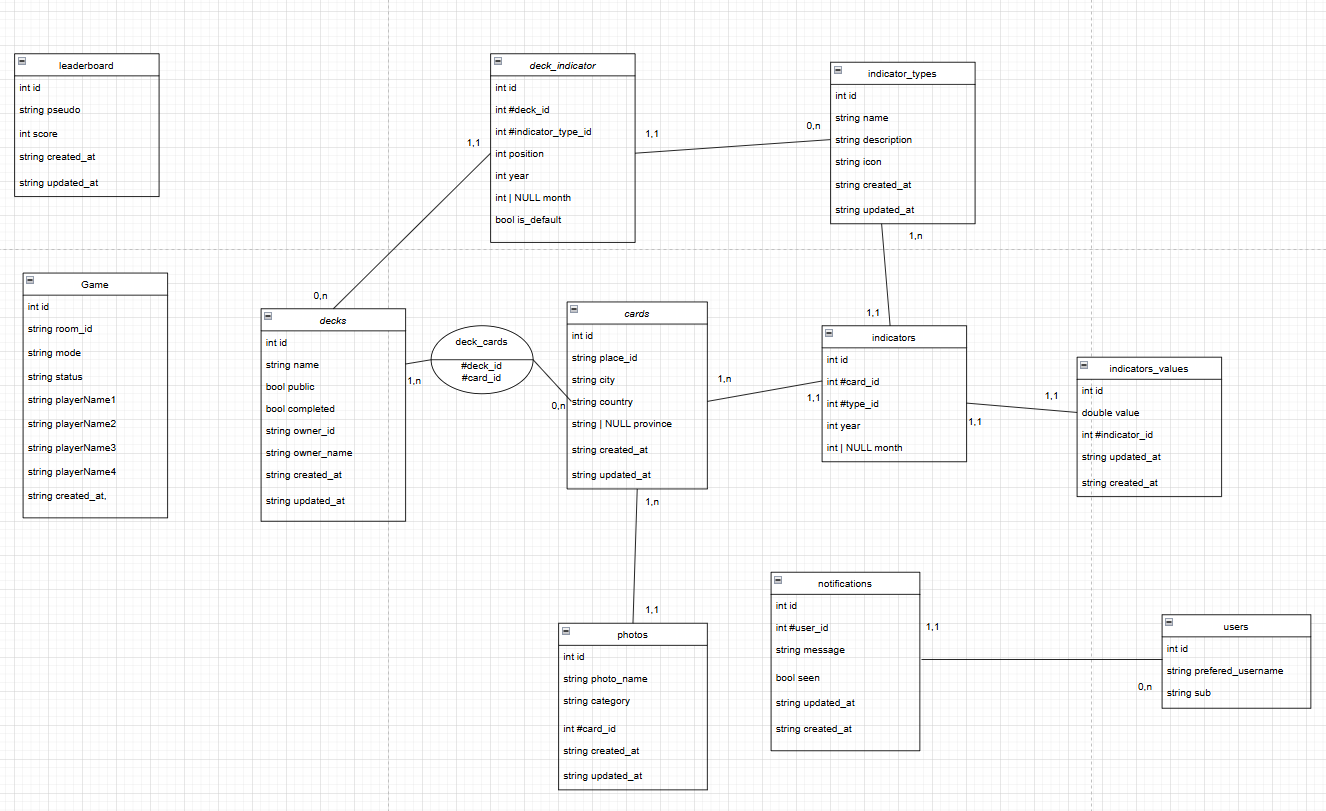
Database MCD
Server code structure
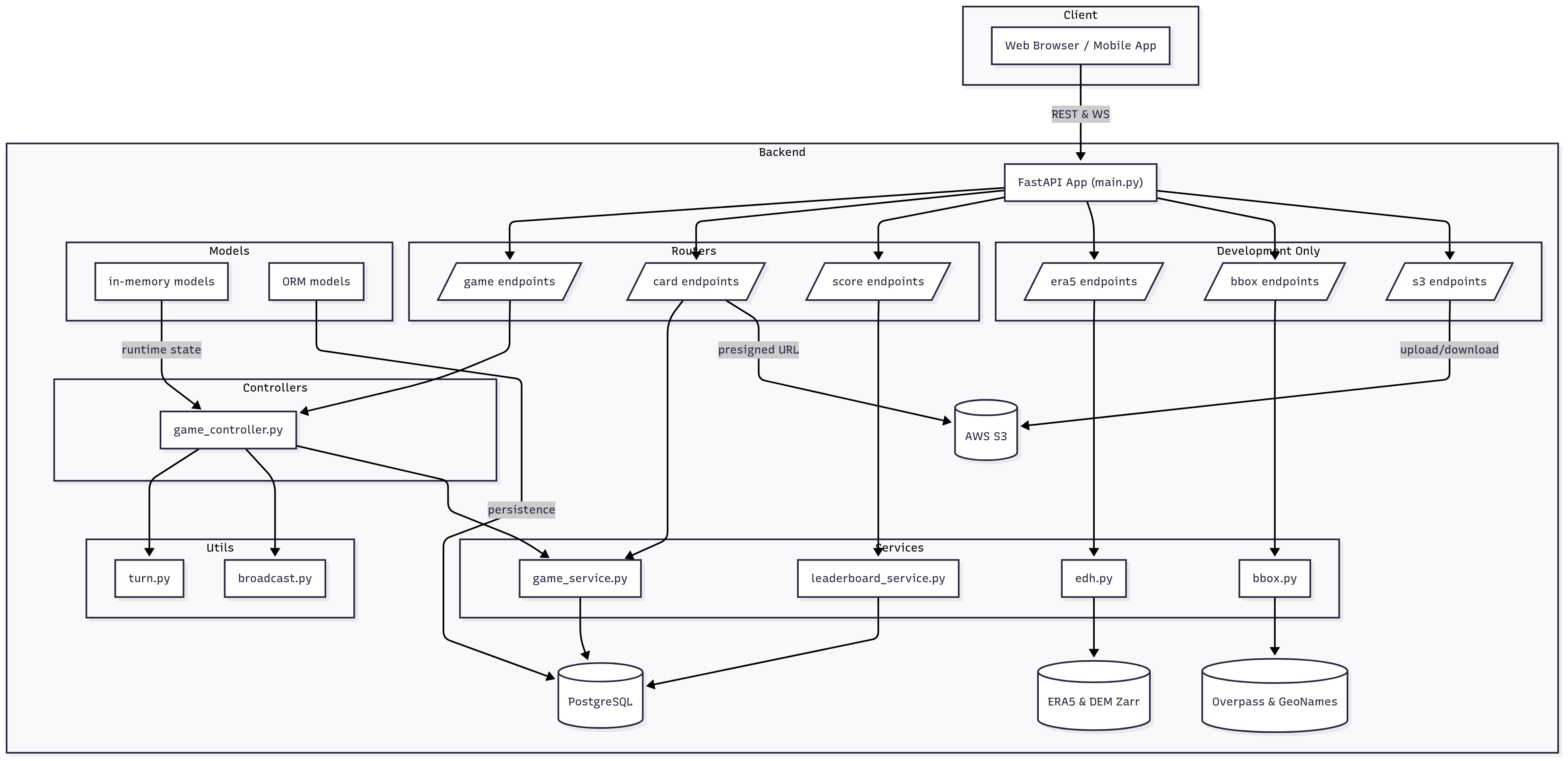
main.py: FastAPI entrypointrouters/: API route definitionsmodels/: Database modelsservices/: Business logicutils/: Utility functions
Server communication
Library
The backend relies on the following key Python libraries:
fastapi – high-performance ASGI web framework
uvicorn – lightning-fast ASGI server
pydantic – data validation and settings management
databases – async support for SQL databases
asyncpg – fast PostgreSQL client for asyncio
sqlalchemy – core ORM and SQL toolkit
sqlmodel – Pydantic + SQLAlchemy integration
python-jose – JSON Web Token implementation
websockets – WebSocket client/server library
requests – HTTP for humans (sync client)
python-dotenv – load environment variables from
.envpsycopg2-binary – PostgreSQL driver (sync)
boto3 – AWS SDK for Python (S3 access)
python-multipart – support for form & file uploads
xarray – N-D labeled arrays & datasets
xarray[io] – I/O engines for netCDF, raster, Zarr, etc.
numpy – numerical computing library
zarr – chunked, compressed, mutable N-dim arrays
fsspec – Filesystem specification for local & remote
s3fs – S3 backend for fsspec
dask – parallel computing with task scheduling
aiohttp – async HTTP client/server framework
For adding dependencies, see requirements.txt.
Server endpoints
POST
/create_room
Create a new game room.
Request body: JSON with room settings (e.g. maxPlayers, mode).
Response:{ "room_id": "...", "settings": { … } }GET
/rooms
List all active game rooms with their current player counts and settings.GET
/playedGame
List all played games with their results and player scores stored in the database.GET
/playedGame/nowList today active games with their result and player stored in the database.WebSocket
/ws/{room_id}/{pseudo}(or/ws/{room_id}/{pseudo}/{token}) Real-time endpoint for game events: join notifications, turn submissions, results, game start/end.GET
/cards
Retrieve metadata for all cards (including presigned image URLs).GET
/score/leaderboard
Fetch the all-time high‐scores leaderboard.GET
/score/leaderboard/now
Fetch today’s high‐scores leaderboard.
Development-Only Endpoints
GET
/era5/era5Retrieve metadata for one deck and assemble card data with climate indicatorsPOST
/era5/era5
Query climate indicators from ERA5/DEM Zarr for a given bounding box.GET
/s3/buckets
Retrieve the names of all s3 buckets accessible by the application.GET
/s3/buckets/{bucket_name}Retrieve information about a specific S3 bucket, including its metadata and ACL.GET
/s3/buckets/{bucket_name}/allRetrieve a list of all object keys in the specified S3 bucket.POST
/s3/buckets/{bucket_name}/uploadUpload a file to the specified S3 bucket.GET
/s3/buckets/{bucket_name}/urlGenerate a presigned URL to upload a file to the specified S3 bucket.
Configuration
Environment variables in
.env(see.env.template)Database and S3 credentials required
Identity & Access Management (IAM)
Modes: visitor vs identified
Visitor (unauthenticated)
Access: home, rules, data information, leaderboard, and gameplay (solo/multi) without an account.
No access: create/edit deck and card screens, and “My decks”.
Identified user (authenticated via Keycloak OIDC)
Additional access: create/edit cards and decks, card library, “My decks”.
The session exposes
username,rolesandsub(user identifier) to associate actions on the API side.
Authentication overview
Frontend (Nuxt 3 + Auth.js)
Authentication handled by
@sidebase/nuxt-authwith a Keycloak (OIDC) provider.Protected routes use
definePageMeta({ auth: true })(e.g.,create-card,create-deck,card-library,my-decks). Gameplay, home, rules, data information, and leaderboard remain publicly accessible.Token handling:
Retrieves
access_token/refresh_tokenat sign-in; extractsusernameand roles from the JWT.Silent
access_tokenrefresh via the JWT callback; auto-refresh on window focus and periodically (~60 s).
Main environment variables:
NUXT_PUBLIC_KEYCLOAK_ISSUER,NUXT_PUBLIC_KEYCLOAK_CLIENT_ID,NUXT_KEYCLOAK_CLIENT_SECRET,NUXT_AUTH_SECRET,NUXT_AUTH_ORIGIN.
Backend (FastAPI)
Token validation & extraction:
Validates
Authorization: Bearer <access_token>against the Keycloak realm public keys using RS256 algorithm.Public keys fetched from Keycloak server or loaded from local file (configurable).
Extracts user context via
extract_user_from_jwt()creatingKeycloakUserobject with:sub(subject identifier),preferred_username,session_id,roles.Token types supported:
Access token: User’s primary authentication token in
Authorizationheader.UMA-ticket token: Resource-based access control grant for authorization (separate from authentication).
Endpoint access patterns:
Protected endpoints:
Depends(get_current_user)(token required, records user activity).Public or visitor-tolerant endpoints:
Depends(get_optional_current_user)(token optional).Service-to-service calls:
get_service_account_access_token()for backend authentication.Game WebSocket (
/ws/{room_id}/{pseudo}): authentication not mandatory; a nickname is sufficient. If a token is provided, events are linked to an identified user.Notification WebSocket (
/notify/connect?token=<access_token>): authenticated via token query parameter.
User activity tracking:
Every authenticated HTTP request and WebSocket connection records user activity: client IP/port, path, method, headers, timestamp.
Stored in
UserActivityORM model for audit trails and monitoring.Optionally sent to external monitoring service in production.
Main environment variables:
Core:
IAM_URL,IAM_REALM.Optional:
ADDR_PUBLIC_KEY(if provided, public key is loaded from file instead of fetching from Keycloak server).Tenancy:
PREMIUM_TENANT_ID,PREMIUM_TENANT_NAME,FREE_TENANT_ID,FREE_TENANT_NAME.
Calling protected API from the frontend
Include
Authorization: Bearer ${session.access_token}when calling protected routes.WebSocket:
ws(s)://<API_BASE>/notify/connect?token=<access_token>Refresh tokens automatically; the frontend handles silent refresh via Auth.js JWT callback.
Accounting & Reporting service
Consumption tracking
Consumption model (file:
apiserver/models/user_consumption_orm.py):Table:
user_consumptions.Fields:
id,user_sub,permission_type(FREE/PREMIUM),resource_consumption_type(CARD_CREATION/DECK_CREATION),status,quantity_consumed,transaction_id,created_at,updated_at,reported_at.Status lifecycle: STARTED (action initiated) → PENDING (queued) → IN_PROGRESS (processing) → SUCCESS (completed, reported) or FAILURE/ABORTED (not counted for quota).
Consumption tracking lifecycle (file:
apiserver/services/consumption_tracker.py):Create consumption record on action start via
ConsumptionTracker(user_sub, permission_type, resource_type).Call
.success()to mark SUCCESSFUL and trigger reporting.Call
.failure()to mark FAILED (not counted against quota or billing).Tracker automatically populates
transaction_id(mapped from user’s resource ID for premium users; null for free tier).
Resource types tracked:
CARD_CREATION: Card creation initiated (quantity: typically 1).
DECK_CREATION: Deck creation initiated (quantity: typically 1).
Extensible for future resource types (e.g., custom indicator computations).
Reporting & billing
Reporting endpoint (file:
apiserver/services/consumption_service.py):Function:
report_resource_consumption(consumption_record).Only reports if
transaction_idis present (premium users only).Sends consumption data to Clearing House:
{ACCOUNTING_BASE_URL}/consumption(HTTP POST).Payload schema:
{ "consumption_id", "transaction_id", "user_sub", "status", "quantity_consumed", "reported_at" }.Authorization: uses service account token (
get_service_account_access_token()).Enabled via feature flag:
ACTIVE_CONSUMPTION_REPORTING(default: false, enabled in production only).Reports queued asynchronously via background task queue to avoid blocking API responses.
Billing integration:
Premium users: transaction IDs linked to resource/user, enabling Clearing House to correlate consumption with billing.
Free users: no transaction ID generated; no billing entry created.
Consumption reported only on SUCCESS status; FAILURE/ABORTED records are not reported.
Environment variables (file:
apiserver/config.py):ACCOUNTING_BASE_URL: Clearing House endpoint base URL (e.g., https://clearing-house.example.com).
ACTIVE_CONSUMPTION_REPORTING: Boolean flag to enable/disable reporting (production only).FREE_TENANT_ID,PREMIUM_TENANT_ID: Tenant identifiers for consumption classification.
User activity monitoring
Activity model (file:
apiserver/models/user_activity_orm.py):Table:
user_activities.Fields:
id,user_sub,scheme(http/https),client_host,client_port,path,method,headers(JSON),timestamp.Captured for every authenticated HTTP request and WebSocket connection.
Activity logging (file:
apiserver/services/user_activity_service.py):Called from middleware/dependency injection on every authenticated request.
Records connection metadata, request details, and headers for audit trails.
Optional integration: sends logs to external monitoring service in production via
monitoring_service.send_event()with:{ "event_type", "user_id", "session_id" }.Monitoring enabled via
ACTIVE_MONITORINGfeature flag (production only).
Purpose:
Audit trails: track user actions and access patterns.
Compliance: support security audits and regulatory requirements.
Analytics: aggregate activity logs for usage reports and insights.
Reward system
The reward system is a gamification feature that recognizes and incentivizes player engagement through coins and achievement badges. Players earn coins by playing games, creating cards and decks, and unlock badges based on cumulative coin milestones or special achievements.
Overview
Coins: Virtual currency earned through platform actions (card/deck creation).
Badges: Achievement trophies unlocked at specific coin thresholds or special occasions.
Player profiles: Track individual player progress (coins earned, games played, highest badge tier).
Dashboard integration: Display player stats and earned badges in the frontend dashboard.
Coin rewards
Card creation: Players earn 5 coins when successfully creating a new card via
POST /cards.Deck creation: Players earn 5 coins when successfully creating a new deck via
POST /decks.Game completion: Players earn 5 coins for every game played, regardless of game mode or game type.
Automatic crediting: Coins are awarded immediately after the resource creation or game completion succeeds.
Persistence: All coin transactions are stored in the
playerstable (coinscolumn) for permanent record-keeping.
Badge system
Badges are achievement milestones that unlock automatically based on cumulative coin totals or special conditions.
Badge tiers
Badge Tier |
Trigger Condition |
Coins Required |
|---|---|---|
First Discovery |
Earned by playing the first game |
N/A |
Bronze |
Cumulative coins milestone |
20+ |
Silver |
Cumulative coins milestone |
50+ |
Gold |
Cumulative coins milestone |
100+ |
Platinum |
Cumulative coins milestone |
200+ |
Diamond |
Cumulative coins milestone |
500+ |
Badge progression
Badges are awarded automatically when a player reaches the corresponding coin threshold.
The
highest_badge_idfield on the player record tracks the highest-tier badge earned.A player earns a badge once per tier; subsequent coins do not re-award the same badge.
Data models
Player model (file: apiserver/models/player_orm.py)
Table:
playersFields:
id: Primary key (autoincrement).user_sub: Stable user identifier from Keycloak (indexed, unique).preferred_username: Player’s display name (from Keycloak token).coins: Total coins accumulated (default: 0).
games_played: Count of games completed (incremented after game finish).highest_badge_id: ID of the highest-tier badge earned (nullable).created_at,updated_at: Timestamps.
Badge model (file: apiserver/models/badge_orm.py)
Table:
badgesFields:
id: Primary key (autoincrement).name: Badge name (e.g., “Bronze”, “Silver”, “Gold”, “Platinum”, “Diamond”).description: Human-readable description.icon_url: Optional URL to badge icon/image.tier: Numeric tier level (0 = Special, 1 = Bronze, 2 = Silver, 3 = Gold, 4 = Platinum, 5 = Diamond).created_at: Timestamp.
Player-Badge association (file: apiserver/models/player_badge_orm.py)
Table:
player_badgesFields:
id: Primary key (autoincrement).player_id: Foreign key toplayerstable.badge_id: Foreign key tobadgestable.earned_at: Timestamp when the badge was unlocked.
Purpose: Maintains a history of all badges earned by each player.
API endpoints
Dashboard endpoints (with reward stats)
GET
/dashboard(authenticated)Returns player profile with coins and highest badge information.
Response includes:
{ coins, games_played, highest_badge, all_earned_badges }Used by the frontend dashboard to display player progress.
Backend reward processing
POST
/cards(authenticated)On successful card creation, triggers coin reward (+5 coins) via
reward_service.grant_coins().Updates player record and checks for badge unlock conditions.
POST
/decks(authenticated)On successful deck creation, triggers coin reward (+5 coins) via
reward_service.grant_coins().Updates player record and checks for badge unlock conditions.
Game completion (WebSocket event)
On game finish, triggers coin reward (+5 coins) via
reward_service.grant_coins()for each participating player.Updates player record and checks for badge unlock conditions.
Reward service endpoints (file: apiserver/services/reward_service.py)
grant_coins(player_id, amount): Award coins to a player and send notification; returns updated coin count.check_and_grant_badge(player_id, badge_id): Grant a specific badge to a player and send notification.evaluate_badge_triggers(player_id, trigger_type, context): Handle special badge triggers (FIRST_GAME, DATE_RANGE).get_player_badges(player_id): Retrieve all badges earned by a player (for dashboard display).get_highest_badge(player_id): Get the highest tier badge earned by the player.get_active_badges(player_id): Get all active badges for the player.
Reward Notification System
The reward system integrates with a real-time WebSocket notification system to alert players when they earn coins or badges.
Notification Architecture:
Backend:
notification_controller.pymanages WebSocket connections (/ws/notifications)Service:
NotificationServicepersists notifications to databaseTransport: Real-time WebSocket for connected users, database persistence for offline users
Frontend: WebSocket client listens on
/ws/notificationsendpoint
Coin Notification:
Trigger: When coins are granted via
reward_service.grant_coins()Message:
"You earned {amount} coins!"Flow: Coins updated → Database committed → User notified via WebSocket and persisted in DB
Badge Notification:
Trigger: When a badge is earned via
reward_service.check_and_grant_badge()Message:
"You earned the {badge_name} badge!"Flow: Badge added to PlayerBadge table → Highest badge updated if applicable → User notified
Offline Behavior:
Notifications are persisted in the database for offline users
When the user connects to WebSocket, all unseen notifications are automatically fetched and sent
Clients can mark notifications as read, which updates the
is_seenflag in the database
Error Handling:
Notification failures don’t block reward grants (wrapped in try-except)
Failed notifications are logged but don’t prevent coin/badge delivery
WebSocket disconnections are handled gracefully, with notifications stored for next login
Integration with existing features
Card creation flow
User submits card creation request with valid data.
Backend validates and creates the card in the database.
reward_service.grant_coins(player_id, 5)is called to award coins.Coin notification is sent:
"You earned 5 coins!"Service checks if the new coin total triggers a badge unlock.
If a badge is earned,
player.highest_badge_idis updated.Badge notification is sent:
"You earned the {Badge Name} badge!"Player receives notifications via WebSocket (real-time) or on next login if offline.
Deck creation flow
User submits deck creation request with valid data.
Backend validates and creates the deck in the database.
reward_service.grant_coins(player_id, 5)is called to award coins.Coin notification is sent:
"You earned 5 coins!"Service checks if the new coin total triggers a badge unlock.
If a badge is earned,
player.highest_badge_idis updated.Badge notification is sent:
"You earned the {Badge Name} badge!"Player receives notifications via WebSocket (real-time) or on next login if offline.
Game completion flow
Game ends; all participating players are identified.
players.games_playedis incremented for each player.reward_service.grant_coins(player_id, 5)is called to award coins for game completion.Coin notification is sent:
"You earned 5 coins!"to each playerService checks if the new coin total triggers a badge unlock for each player.
If a badge is earned,
player.highest_badge_idis updated.Badge notification is sent:
"You earned the {Badge Name} badge!"to players who earned itAll players receive notifications via WebSocket or on next login if offline.
Final leaderboard reflects updated game counts.
Notification Delivery Guarantee:
Notifications are stored in database immediately when coins/badges are awarded
Connected users receive notifications via WebSocket instantly
Offline users retrieve stored notifications on next WebSocket connection
All notifications maintain timestamps and read status for audit trail
Configuration
Currently, all reward system parameters are hardcoded within the service. Future enhancements may include:
Configurable coin amounts: Move reward values (e.g., 5 coins per card) to environment variables.
Dynamic badge thresholds: Allow different coin requirements per environment.
Extensible badge criteria: Support conditional badges (achievements based on game results, leaderboard rank, etc.).
Operational notes
Player creation: Players are auto-created on first authenticated action (card/deck creation, game join) and linked via Keycloak
subidentifier.Reward atomicity: Coin grants and badge unlocks are executed in a single database transaction to ensure consistency.
Notification delivery: Notifications are created in the database immediately after rewards are granted, ensuring no data loss. WebSocket delivery is best-effort; failures don’t block reward processing.
Offline users: All notifications are persistent in the database. When users reconnect via WebSocket, they automatically receive all unseen notifications.
Performance: Reward checks are lightweight (single DB lookup and update); no external service calls required. Notification creation is also minimal-overhead.
Error resilience: If notification system fails, rewards are still granted and persisted. Failed notifications are logged for monitoring but don’t prevent game progression.
Visibility: All player reward data is visible in the frontend dashboard, providing feedback and motivation for continued engagement. Real-time notifications enhance user experience.
Cloud deployment (production)
Production environment run on dedicated Kubernetes cluster. Build and deployment are performed using a Gitlab pipeline (not supplied here) however, there’s nothing to prevent manual deployment.
ℹ️ You need to ensure a functional PostgreSQL database and a Kubernetes cluster
Create a kubernetes namespace to isolate the application in your cluster :
kubectl create namespace climate-cards-game
Backend (apiserver)
You can adapt the file apiserver/deploy/production.yaml to fit your deployment goal.
cd apiserver

# STEP 1: Build docker image
docker build -t apiserver:latest .

# STEP 2: Create Kubernetes resources
kubectl -n climate-cards-game create secret generic apiserver-db \
      --from-literal=DB_HOST= \
      --from-literal=DB_PORT= \
      --from-literal=DB_NAME= \
      --from-literal=DB_USER= \
      --from-literal=DB_PASSWORD= \
      --dry-run=client -o yaml | kubectl apply -f -
kubectl -n climate-cards-game create secret generic apiserver-aws \
      --from-literal=AWS_ACCESS_KEY= \
      --from-literal=AWS_SECRET_KEY= \
      --dry-run=client -o yaml | kubectl apply -f -
kubectl -n climate-cards-game create secret generic apiserver-destine \
      --from-literal=EDH_API_KEY= \
      --dry-run=client -o yaml | kubectl apply -f -
kubectl -n climate-cards-game apply -f deploy/production.yaml
Frontend
You can adapt the file frontend/deploy/production.yaml to fit your deployment goal.
cd frontend

# STEP 1: Build docker image
docker build -t frontend:latest .

# STEP 2: Create Kubernetes resources
kubectl -n climate-cards-game apply -f deploy/production.yaml
Dashboard
You can adapt the file dashboard-frontend/deploy/production.yaml to fit your deployment goal.
cd frontend-dashboard

# STEP 1: Build docker image
docker build -t dashboard:latest -f Dockerfile.prod .

# STEP 2: Create Kubernetes resources
kubectl -n climate-cards-game apply -f deploy/production.yaml
License
This game is free software, developed by ATOS for ESA DestinE. Licensed under the Apache License, Version 2.0 (see LICENSE).